Independent Technical Reference & Compatibility Guide
BMW CIC Map Update & Navigation System Guide
Comprehensive verification guide for the BMW Car Information Computer (CIC) navigation platform. Confirm your on-screen map family, identify verified production chassis (2008–2013), distinguish CIC from NBT, and prepare for legitimate Road Map PREMIUM updates.
1. What Is the BMW CIC Navigation System?
The Car Information Computer (CIC) represents BMW's second-generation iDrive navigation and infotainment architecture. Introduced in late 2008 to replace the first-generation optical-disc-based CCC (Car Communication Computer), CIC marked a major technological evolution for BMW by storing onboard navigation databases directly on an internal storage unit within the vehicle head unit rather than relying on external physical DVD discs during navigation routing.
As a full navigation platform, CIC integrated central vehicle diagnostics, multimedia playback, and route guidance into a centralized widescreen dashboard display. It was standard equipment on higher-specification BMW models through 2012 and 2013, after which it was succeeded by the third-generation NBT (Next Big Thing) system.
2. How to Check If Your BMW Uses CIC
Vehicle registration documents and visual dashboard aesthetics can often be ambiguous, especially for vehicles built near generation boundaries. The only authoritative way to verify that your vehicle operates on the CIC platform is through the in-car software interface.
On-Screen Navigation Version Display
Open the navigation settings on your central display and locate the navigation system / map version information screen.
BMW Group
Road Map [Region] PREMIUM [Year]
If the displayed text explicitly contains the map family designation PREMIUM, your BMW is confirmed to be running the CIC system.
Visual Interface Characteristics
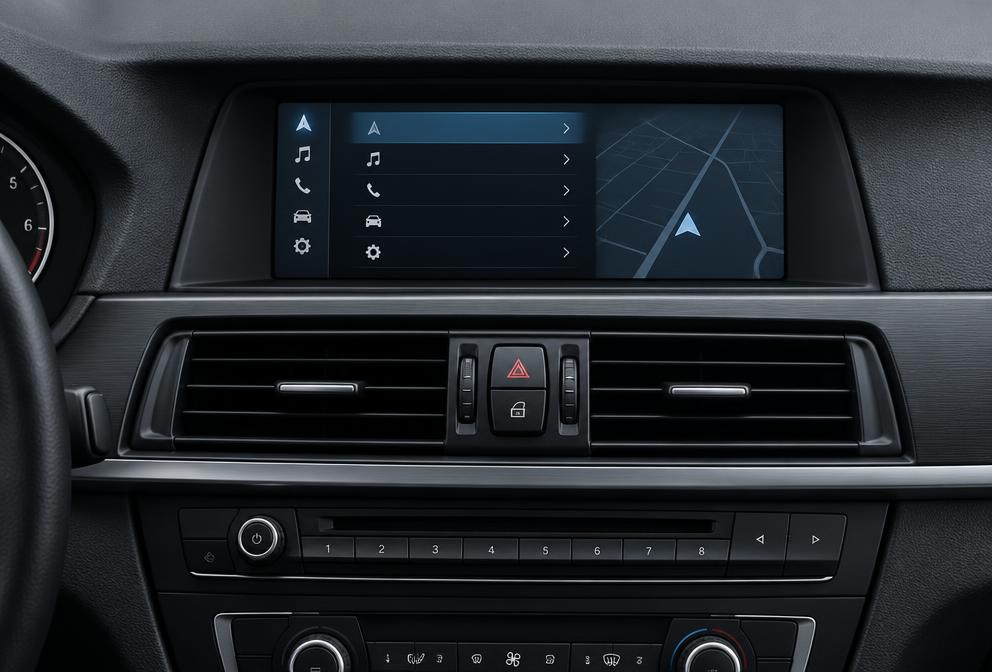
The CIC graphic user interface features a distinctive horizontal list arrangement. Active menu selections are highlighted with bold orange outline bars, accompanied by rotating side-column secondary menus. This contrasts with earlier CCC four-quadrant layouts and subsequent NBT dynamic semi-transparent card panels.
Technical Specification Slot: System Verification Process
3. CIC Map Family: Road Map PREMIUM
Authoritative Map Family Assignment
In BMW navigation taxonomy, map packages are compiled for specific hardware platforms designated by proprietary map family identifiers. For the CIC system, the designated map family is strictly Road Map PREMIUM.
Map updates are associated with specific map families. An update intended for a different map family (such as NEXT, EVO, ROUTE, WAY, or LIVE) should not be treated as compatible with CIC; verify the displayed map-family/version information first.
Secondary Source Notes & Attribution Context
VERIFIED: BMW CIC Professional uses Road Map PREMIUM.
DISPUTED: Some sources additionally associate MOVE and/or MOTION with CIC, while other sources associate those families with different hardware. NavDecode treats those additional associations as unresolved pending further authoritative manufacturer evidence.
4. BMW Chassis Associated With CIC
Repository technical records (file seo/05_entity_relationships.csv) verify CIC fitment exclusively across nine BMW vehicle chassis designations. Fitment was tied to specific lifecycle phases across E-series models, alongside F10 and F25 models.
| Chassis Code | BMW Model Series | Lifecycle Phase | Map Family |
|---|---|---|---|
| E90 LCI | 3 Series Sedan | Facelift (from late 2008) | PREMIUM |
| E91 LCI | 3 Series Touring | Facelift (from late 2008) | PREMIUM |
| E92 LCI | 3 Series Coupe | Facelift (from late 2008) | PREMIUM |
| E60 LCI | 5 Series Sedan | Late production lifecycle (from late 2008) | PREMIUM |
| E70 | X5 Sports Activity Vehicle | 2010–2013 model years | PREMIUM |
| E71 | X6 Sports Activity Coupe | 2010–2013 model years | PREMIUM |
| E89 | Z4 Roadster | Full generation lifecycle | PREMIUM |
| F10 | 5 Series Sedan | Production cycle (2010–2013) | PREMIUM |
| F25 | X3 Sports Activity Vehicle | Production cycle (2011–2013) | PREMIUM |
Chassis Exclusions and Boundary Guidance
Earlier pre-LCI E-series vehicles (such as 2004–2007 E60 5 Series or 2005–2007 E90 3 Series) were factory-equipped with the CCC system, which features two front-facing optical disc drives and takes Road Map HIGH or PROFESSIONAL DVDs. F10 is included in NavDecode's verified CIC chassis set. Do not identify the navigation system from model/chassis and year alone when current evidence does not verify a specific transition; check the displayed map family and version information instead.
5. CIC Production Window and Support Status
According to repository entity records supported by automotive evidence sources S1, S2, S3, and S5:
- Production Start: 2008
- Production End: 2013
- Lifecycle Support Status:
wind-down
A wind-down status signifies that BMW factory development for new map releases on this generation is in its concluding lifecycle phase. While compatible map updates continue to be distributed through authorized channels to support vehicles currently in service, release cycles are less frequent than active platforms (such as EVO or LIVE). Owners should obtain legitimate map editions compiled specifically for the Road Map PREMIUM specification.
6. CIC vs NBT: What to Verify
One of the most frequent compatibility questions encountered by BMW owners is determining whether their car has CIC or NBT (Next Big Thing). Because the transition occurred between late 2012 and early 2013 across overlapping assembly plants, model year alone cannot definitively settle the question.
| Attribute | BMW CIC Professional | BMW NBT |
|---|---|---|
| Map Family | Road Map PREMIUM | Road Map NEXT |
| Production Window | 2008–2013 | 2012–2016 |
| Menu Architecture | Horizontal category lists with orange highlight bars | Dynamic semi-transparent tile interface |
| Representative Chassis | E90/E91/E92 LCI, E60 LCI, E70, E71, E89, F10, F25 | F30, F31, F34, F20, F21, F15, F16, I01 |
Transitional 2012–2013 Model Year Verification
If your BMW was built between September 2012 and mid-2013, do not rely on vehicle purchase invoices or dealer paperwork. Open the map version screen in your vehicle. If the label indicates Road Map ... PREMIUM, order updates for CIC. If it indicates Road Map ... NEXT, your vehicle is equipped with NBT.
7. Before You Update Your CIC Maps
Installing map data on a BMW CIC head unit transfers extensive geographic files into the onboard storage system. To ensure a smooth update, verify these four operational prerequisites:
- Confirm Map Family Compatibility: Verify on screen that your vehicle currently displays Road Map ... PREMIUM. Map files from other families (such as NEXT or ROUTE) will be ignored by the system.
- Prepare Compliant USB Media: Map update files are transferred via a USB flash drive formatted in standard FAT32 (a standard format recognized by automotive head units).
- Practical Precaution — Power Supply: Transferring extensive map data into CIC internal storage takes time. As a practical best practice, maintain steady vehicle voltage during data transfer (such as during an extended drive or using a battery maintainer) to prevent interruption.
- Select the Correct Regional Edition: Verify that your update package matches your vehicle's operational territory (for instance, North America PREMIUM for US/Canada vehicles, or Europe PREMIUM West/East for European models).
8. FSC Activation — What You Need to Know
Role of the Freischaltcode (FSC)
Unlike the preceding CCC platform which relied strictly on physical optical disc authentication, the CIC system introduced electronic licensing through an FSC activation code (Freischaltcode). Technical repository records confirm that CIC mandates valid activation (fsc_required = yes).
Some BMW navigation systems require a vehicle-specific FSC activation code before a map update can be activated. When new map data is loaded into the vehicle, the iDrive system prompts the operator for activation to authorize installation. NavDecode does not generate or supply FSC activation codes; use an authorised source for activation support.
Legitimate Activation and Policy Boundaries
NavDecode provides technical compatibility guidance to help BMW owners maintain their onboard navigation systems through legitimate channels. We strictly adhere to security and legal boundaries:
- Map updates require authorized license acquisition paired to your vehicle VIN.
- We strictly provide guidance for official navigation updates and legitimate activation, and do not facilitate or document unauthorized modification tools or unofficial procedures.
- Legitimate navigation updates safeguard system stability and preserve vehicle warranty integrity.
9. What Is Not Yet Verified
To maintain absolute transparency and prevent misleading claims, NavDecode documents technical boundaries where data is unresolved or excluded from published guidance:
- Unresolved MOVE/MOTION Associations: While Road Map PREMIUM is verified for CIC Professional, secondary source references associating MOVE or MOTION with CIC remain unresolved across conflicting catalog records.
- Internal Hardware Drive Specifications: Internal component details (such as drive capacity, controller chipsets, and bus speeds) are unverified in repository source datasets and are excluded from technical claims.
- Plant-Specific Assembly Cutoff Dates: Exact manufacturing changeover dates varied by assembly facility (e.g. Dingolfing, Regensburg, Spartanburg). Vehicle owners should never assume system type from build paperwork alone without visual on-screen verification.
10. Frequently Asked Questions
Is my BMW equipped with CIC or NBT?
The definitive method to distinguish CIC from NBT is checking the in-car software screen. In your iDrive menu, navigate to Navigation -> Options -> Navigation System Version. If the top line reads 'Road Map ... PREMIUM', your vehicle is equipped with CIC. If it reads 'Road Map ... NEXT', your vehicle is equipped with NBT. Vehicles produced during the 2012–2013 transition window should always be verified by screen label rather than model year alone.
What map family does BMW CIC use?
BMW CIC Professional uses verified Road Map PREMIUM map releases. Other map families (such as NEXT, EVO, ROUTE, or WAY) are designed for different hardware platforms. Update archives are compiled for specific geographic regions such as North America PREMIUM or Europe PREMIUM.
Does BMW CIC require an FSC activation code for map updates?
Yes. Repository technical records verify that BMW CIC requires an FSC (Freischaltcode) activation code (fsc_required = yes). Some BMW navigation systems require a vehicle-specific FSC activation code before a map update can be activated. NavDecode does not generate or supply FSC activation codes. Use BMW or another legitimate authorised source for activation support.
Which BMW chassis are verified to use CIC?
Repository technical records verify CIC on nine specific BMW chassis: E90 LCI, E91 LCI, E92 LCI (3 Series facelift), E60 LCI (5 Series facelift), E70 (X5), E71 (X6), E89 (Z4), F10 (5 Series), and F25 (X3). Pre-LCI E-series models generally used CCC. Always verify the on-screen navigation system version label to confirm the installed platform.
Are BMW CIC map updates still actively supported?
BMW CIC is currently in wind-down support status. While compatible Road Map PREMIUM updates have remained available through legacy distribution channels, release frequencies operate on an extended compilation schedule compared to active modern platforms such as EVO and LIVE.
11. Need Help Identifying Your System?
If your BMW falls near a generation boundary or your on-screen map version label is unclear, use our interactive verification tools or reach out to our technical support team before attempting any update.